


inKind
4.81.48K Reviews
App Specs
- Version
- 6.64.0
- Updated On
- License
- Free
- Downloads
- 500,000+
- Developer
- inKind
- Categories
- Food & Drink
- Platform
- Android, iOS
Screenshots
 Analysis by AppCompare
So, I recently stumbled upon this nifty app called inKind, and let me tell you, it’s quite the game-changer for foodies and restaurateurs alike. Having given it a whirl for a couple of weeks, I’m here to spill the beans on what makes this app tick, and why it might just become your new best friend when dining out.
The core idea: dining credit with a return
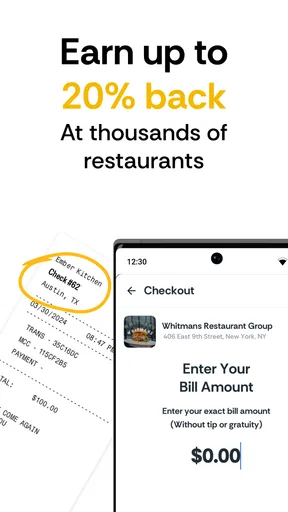
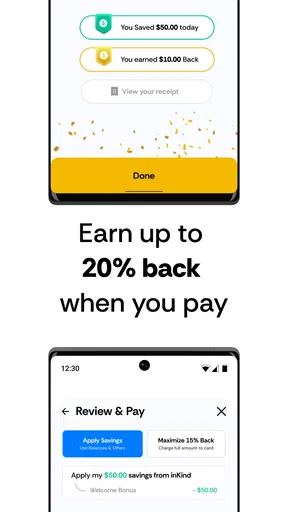
The feature that shapes the experience is the chance to get value back when paying through the app. inKind is a free food and drink app from developer inKind, and its central appeal is straightforward: use it at participating restaurants and you can get up to 20% back. That changes the decision from simply choosing a place to eat into asking whether you’ll actually visit that place often enough to use the value you receive.
That distinction matters. A credit offer can feel like a saving, but it is useful only when it fits a meal you already wanted. I would not pick a restaurant solely because a reward sounds generous; I would first check whether the venue, menu, location, and occasion suit me. Used that way, the benefit can make an existing dining plan more rewarding rather than turning a discount into a reason to spend more than I intended.
What is inKind All About?
At its core, inKind is a platform that aims to revolutionize the dining experience by connecting diners with restaurants in a way that’s beneficial for both parties. The app offers a unique system where you can buy credit to spend at your favorite eateries, often with some sweet bonuses tossed in. Think of it as a modern twist on the gift card concept, but tailored to elevate your dining adventures.
The User Experience
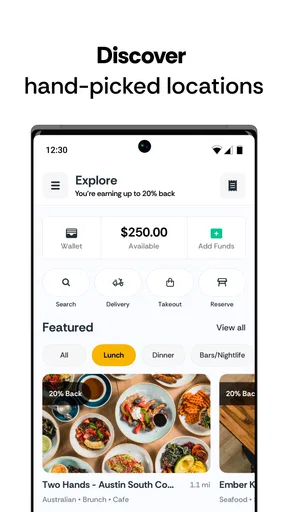
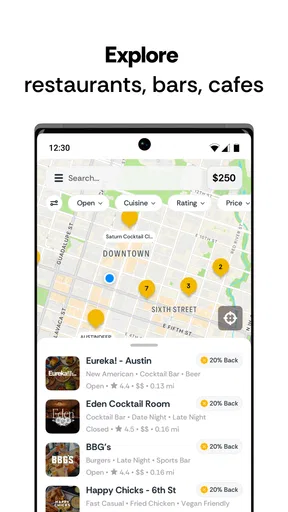
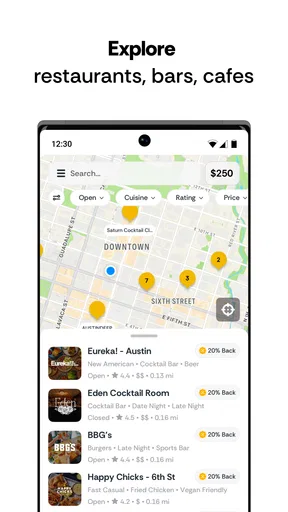
Let’s talk about the user interface first. Navigating through inKind is smoother than a perfectly whipped hollandaise. The design is sleek and intuitive, making it super easy for anyone to get started. You can search for participating restaurants, check out their menus, and even view special offers. The app also keeps track of your credits and spending, which is super handy for those of us who like to keep an eye on our budgets.
For a useful first pass, I’d search by the neighborhood where I actually plan to eat, then compare the listed options with the menus and offers before buying anything. That order helps prevent a common mistake with dining-credit apps: treating the balance as the main attraction and only afterward discovering that the available restaurant is inconvenient or not right for the group. A short browse can also help answer a practical question: is there a participating place that suits tonight’s plan, or is this better saved for a future outing?
I would also think about who is joining me before committing to credit. A restaurant that works for a relaxed meal with friends may not be the right choice for a quick solo lunch or a family dinner with different preferences. The app can help surface choices, but it cannot make the menu fit everyone; checking that detail beforehand is part of getting real value from the reward.
Worth Reading Before You Choose

EA SPORTS FC Mobile 26 Is a Bigger Football Game, but It Takes Time

Flipboard Shows What News Apps Must Do Beyond the Feed

Switching to Android Auto Means Rethinking Your Driving Routine

Google Calendar Makes a Crowded Week Easier to Manage

Ludo King Makes the Most of the Minutes Between Plans

Baby Panda World Brings Quick Play to Modern Phones, but Its Game Library Feels Busy
How Does It Work?
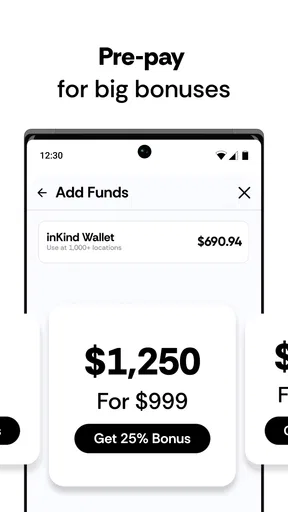
Getting started with inKind is a breeze. You purchase dining credit through the app for your favorite restaurant, and in return, you often get a bonus amount added to your credit. For instance, spending $100 might get you an extra $20 to splurge on that decadent dessert you’ve been eyeing. It’s a win-win situation: you save some cash, and the restaurant gets upfront payment, which is fantastic for their cash flow.
The most sensible workflow, in my view, is to browse first, decide where you genuinely want to eat, and then consider purchasing credit for that restaurant. Keep the credit in mind when planning the meal, rather than assuming it behaves like ordinary cash everywhere. Since the value is tied to participating restaurants, flexibility is lower than it is with a general-purpose payment method. That trade-off is manageable when the restaurant is already on your shortlist, but less attractive if your plans change frequently.
Before relying on a balance for a particular bill, I’d take a moment to review the restaurant and offer details in the app. This is a small habit, but it avoids building a plan around an assumption about how a specific credit or offer applies. It is also worth treating a bonus as a nudge, not as a reason to increase an order: the useful comparison is what you expect to pay for a meal you wanted, not the largest possible balance shown on screen.
Features That Stand Out
Some standout features include:
- Instant Gratification: The moment you purchase credit, it’s ready to use. No waiting around, just instant culinary joy.
- Community Connection: You get to support local businesses directly, which is a huge plus in today’s world.
- Bonuses and Rewards: In addition to bonus credits, some restaurants offer exclusive deals just for inKind users.
For me, the less obvious benefit is not just getting a bonus; it is having a reason to plan a visit to a restaurant I already like or have been meaning to try. That can make the app useful for a planned date night, a birthday meal, or a catch-up with friends, when the venue is chosen in advance and the group is comfortable with the menu. It is less suited to an improvised evening when the destination could change at the last minute.
A practical tip is to avoid spreading small balances across places you rarely visit. One credit balance connected to a restaurant you return to is easier to remember and use than several balances tied to one-off decisions. I would make the purchase only after checking that the restaurant is genuinely a likely repeat choice, and keep the app handy when it is time to pay so the intended payment method is not an afterthought.
What I Loved
One of the things I really loved about inKind is the sense of community it fosters. By using the app, you’re not just a diner; you’re part of a movement to support and sustain local eateries. Plus, who doesn’t love getting a little extra for their money? The bonus credits really do feel like a special treat.
In an everyday scenario, I can see myself checking the app before meeting a friend for dinner. If a participating restaurant nearby already suits our budget and tastes, I can choose it, review the offer, and plan to pay through inKind. The key is that the app supports a decision I would have made anyway; it does not need to replace every restaurant search or become my only way to pay. That makes the reward feel like a useful extra rather than a chore to optimize.
Compared with ordinary restaurant discovery apps, inKind’s emphasis is different. A discovery app is often most helpful when I want a broad range of places or need to compare reviews and options across a whole area. inKind is more compelling once I have found a participating restaurant and want to make the payment experience more rewarding. A standard card or cash payment remains simpler when I want maximum flexibility, while a restaurant’s own offer may suit me better if it is more relevant to the place I am visiting.
Room for Improvement
While inKind is pretty stellar, there are a few areas that could use a bit of polish. For instance, the app could benefit from more restaurant partnerships in certain areas. In some places, choices might be limited, which could be a bummer if you’re looking to explore a variety of cuisines.
That limitation affects more than discovery. If the local selection does not match your routine, a credit balance may be harder to use naturally, and a reward cannot compensate for a restaurant that is too far away or simply not your kind of place. I would check the options around home, work, and the neighborhoods I visit most before treating the app as a regular dining tool. If the useful choices are sparse, I would keep to normal payment methods rather than buying credit just to try the system.
There is also a planning trade-off. Pre-purchasing credit asks me to make a decision before the meal, while paying with a regular card leaves the choice open until the bill arrives. That commitment can be worthwhile for someone with a favorite participating restaurant, but it is a poor fit for a traveler, a person who rarely eats out, or anyone whose plans are unpredictable. I would skip the purchase if I could not comfortably see myself using the balance.
The app’s overall store rating is 4.9 from around 14,000 ratings, and it has over 500,000 installs. Those figures suggest that many diners find the concept appealing, but they do not change the personal calculation: what matters most is whether the restaurants available to me fit my habits. The app is free and rated for Everyone, so trying it out is a low-friction way to check the local selection; committing money to restaurant credit is a separate decision that deserves a little thought.
Who Gets the Most from It?
I’d recommend inKind most readily to people who dine out regularly, have a few participating restaurants they genuinely enjoy, and are comfortable planning at least some meals ahead. It can also suit someone organizing a group dinner, provided the restaurant works for everyone and the person buying credit is happy to use that venue. The app’s strongest case is a repeatable routine, not a one-time hunt for the biggest offer.
On the other hand, I would not recommend making it a default for someone who mostly cooks at home, often changes plans, or wants to choose a restaurant spontaneously from a wide range of options. It is also less useful when the available participating venues are inconvenient. In those cases, a general dining-discovery app can be better for deciding where to go, and a regular payment method is better for keeping every option open.
The app has been available since August 13, 2018, and its current version is 6.54.0, with Android support starting at version 7.0. I see that as useful context for someone checking whether their device can run it, but the more important decision is still local coverage and fit. I would install it, browse the restaurants I might actually visit, and only then decide whether its credit-and-reward approach belongs in my routine.
Final Thoughts
All in all, inKind is a fantastic app for anyone who loves dining out and supporting local businesses. It’s a smart, rewarding way to enjoy your meals while contributing to the community. Whether you're a foodie looking for new experiences or just someone who enjoys a good deal, inKind is definitely worth checking out. So, why not give it a try and see how it can enhance your dining adventures?
Pros
- Offers exclusive dining credits.
- User-friendly interface for easy navigation.
- Wide range of partner restaurants.
- Quick and secure payment options.
- Regular updates with new features.
Cons
- Limited to select cities only.
- Requires upfront credit purchase.
- No option for direct refunds.
- Occasional app performance issues.
- Limited customer support hours.
FAQs for inKind
What is inKind, and how does it work?
inKind is a unique app designed to enhance your dining experience by offering pre-purchased dining credits at partner restaurants. Users can buy these credits at a discount and redeem them for meals, providing savings while supporting local eateries. The app also offers personalized recommendations based on your dining preferences.
How can I purchase and redeem dining credits on inKind?
Purchasing dining credits on inKind is simple. After downloading the app, browse through the list of participating restaurants, select one, and purchase credits. These credits can then be redeemed directly in the restaurant by showing the digital voucher to your server at the time of payment.
Is there a membership fee to use inKind?
No, there is no membership fee to use inKind. The app is free to download and use. You only pay for the dining credits you choose to purchase, which can then be used at any restaurant within the inKind network.
What happens if I don’t use all my dining credits in one visit?
Unused dining credits remain in your inKind account and can be used at any time in the future. There is no expiration date on these credits, allowing you the flexibility to enjoy them at your convenience across multiple visits or at different partner locations.
Are there any restrictions on the use of inKind credits?
While inKind credits offer great flexibility, they can only be used at participating partner restaurants within the app’s network. It’s important to check the app for the latest list of partners and any specific terms or conditions that might apply to certain restaurants.


